- ProductsSearch and BrowseRecommendationsCustomer Engagement
5 Pain Points of Traditional Search in Ecommerce & Retail


Key Takeaways
- Traditional search ranks products by text match which is generally called “keyword search.”
- A loyal customer and a new shopper often get the same results when ecommerce retailer sites are powered by keyword search.
- When search fails, shoppers assume the store doesn't sell the product, even when it's in stock.
- Keyword search improves only as fast as a merchandising team can write synonyms, rules and product data fixes.
- Shopper behavior has been moving to conversational description rather than typed terms, and fixing any of this usually requires more than a configuration change.
Your search bar gets your highest-intent traffic, and it still runs on logic that reads words, not shoppers.
Think about who uses it. Browsers scroll the homepage and wander through categories. Shoppers who know what they want go straight to the search bar and tell you, in their own words. Baymard Institute's research finds that roughly half of users prefer search over menus to find products. They are the closest thing an online store has to a customer walking up to the counter and asking.
Yet most site search was built to match the words in a query against the words in a product feed. It returns what matches, not what the shopper meant.
None of this shows up as an outage. It hides inside numbers that look normal: a search conversion rate nobody questions, a zero-results report that's always a few pages long, a synonym list that only ever grows. Here are the five moments where traditional site search loses the shopper, and why they leave.
1. The Shopper Described What They Needed. Search Matched Only the Words.
A shopper with a sore knee opens a sporting goods site and types "knee pain." They don't know the product is called a compression sleeve or kinesiology tape. They describe the problem, the way they would to someone behind the counter.
Traditional search reads "knee" and "pain" as two words to find. It returns knee-length shorts, knee socks and a gardening kneeler, while the sleeves and tape sit pages down. The same thing happens with "wedding gifts," "gaming chair" or "something for a long-haul flight."
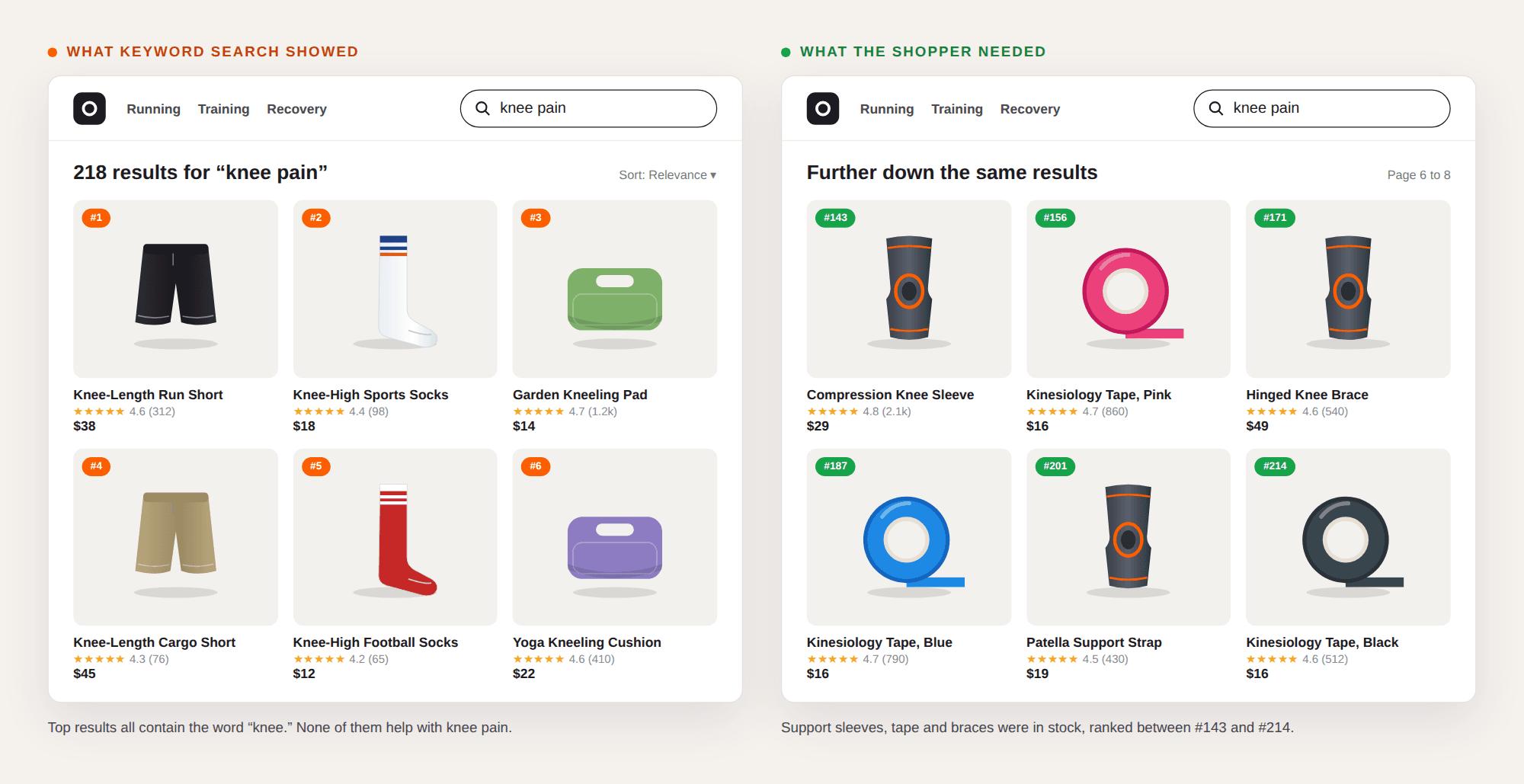
WHY THE SHOPPER LEFT: They asked a clear question and got an answer to a different one. Baymard Institute notes ~31% of shoppers abandon a site entirely out of frustration when they can’t find an item via on-site search. A shopper looking at shorts and socks after typing "knee pain" doesn't think the search engine misunderstood them. They think the store doesn't sell what they need, so they go to another ecommerce site, where the same query works first time.
2. The Product Was in Stock, Your Search Said "No Results."
A shopper types "red linen midi dress." The catalog has several. But the product titles say "Scarlet Midi," and the fabric sits in an attribute field the search index never reads. The engine finds no match, shows an empty page and suggests the shopper "try another search."
Zero results is the obvious failure. The quieter one is a results page with 800 products where the right dress sits on page six, below everything that happened to contain the word "red." Both pages send the same message.
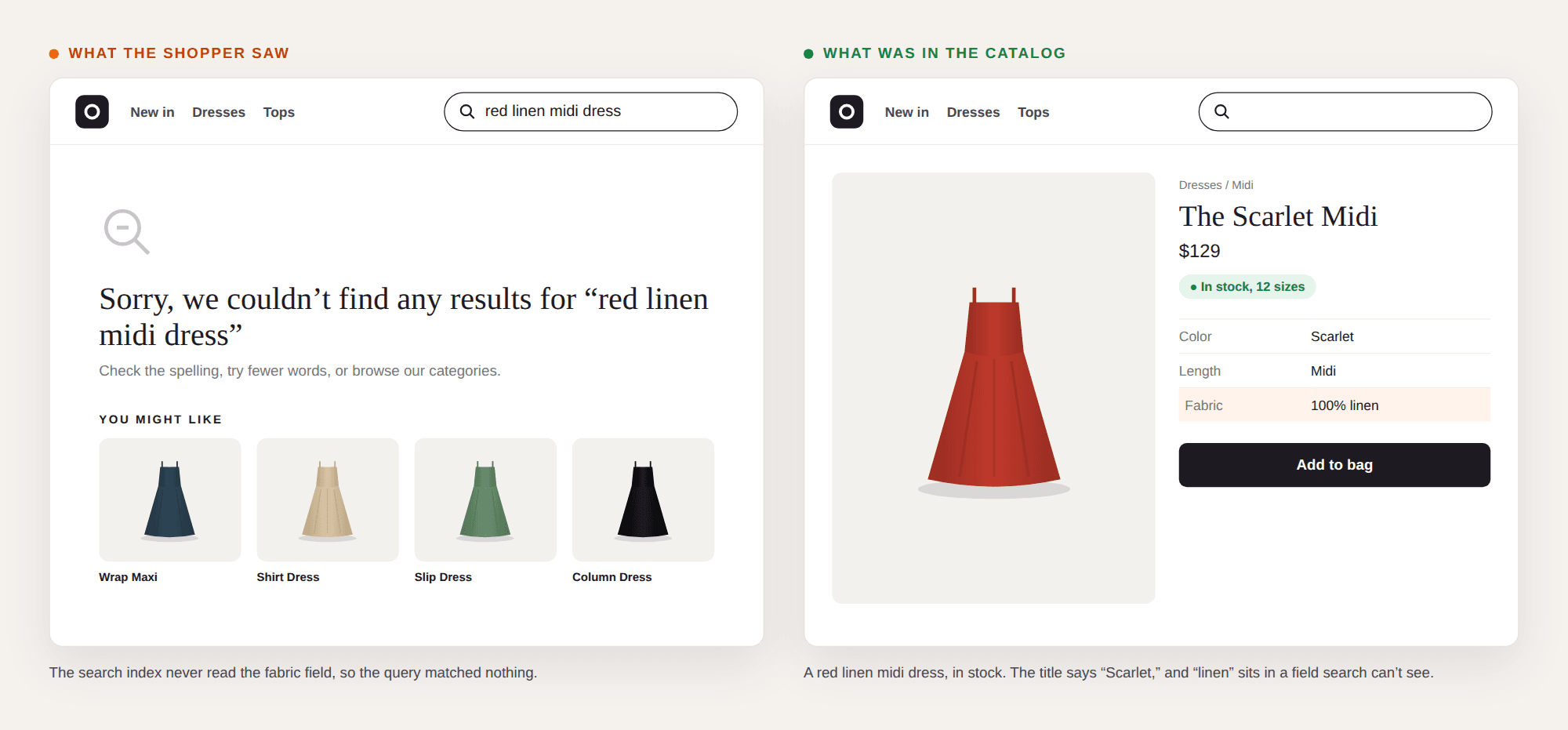
WHY THE SHOPPER LEFT: A dead end reads like a final answer. Very few shoppers rephrase a query three times. They trust the first page they see and move on to a competitor. The brand paid to bring that visit in, paid to stock, photograph and list the dress, and lost the sale at the very last step. The shopper knew exactly what they wanted. The search bar was only listening for an exact string of words.
3. The Shopper Typed "Couch," but Your Catalog Says "Sofa."
Shoppers don't write the way merchandisers do. They may type "couch" when the catalog says "sofa," "trainers" when it says "sneakers," "13in" when the title says "13-inch," and "headfones" when they're typing a query on their phone. Product names change from region to region and country to country, brands get spelled the way they sound, and sizes and measurements arrive in every format. Keyword search treats each of those as a different query.
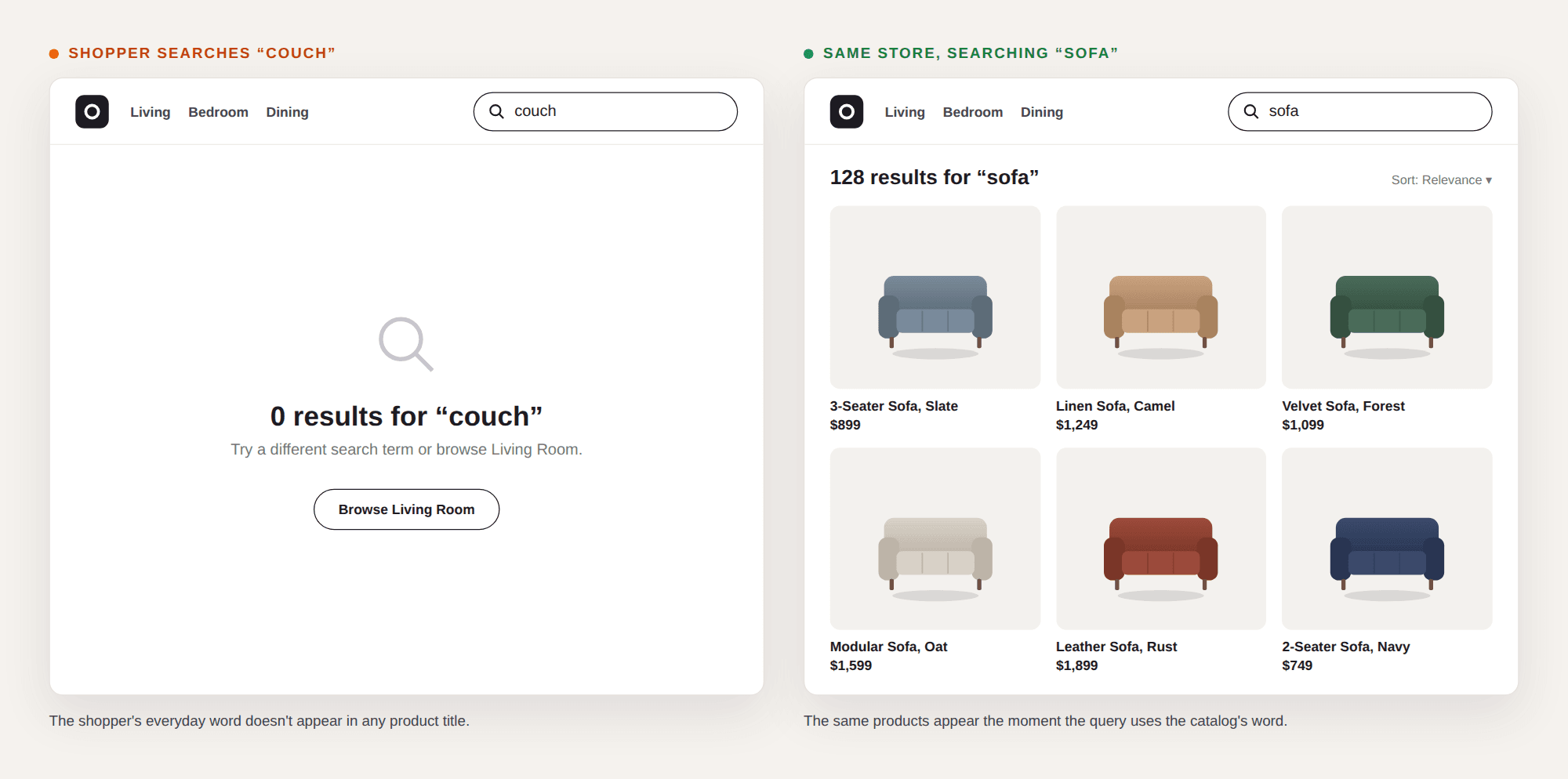
WHY THE SHOPPER LEFT: They used a perfectly normal word, and the site claimed to not have the product. Nothing on the page says "we call it a sofa." Every regional term, typo and shorthand, your site search hasn't been told about turns a ready buyer away. The words didn't match, so as far as search was concerned, the shopper didn't count.
4. A Loyal Customer and a First-Time Visitor Saw the Same Product.
One customer has bought the same brand of running shoes, in the same size, three times. They type "running shoes." So does someone visiting the site for the very first time. Both get an identical results page, in an identical order, led by whatever scored highest on text match or whatever a merchandiser pinned to the top last quarter.
Traditional search ranks products by how well their text matches the query. It ignores everything the site already knows: what this shopper bought before, what they looked at five minutes ago, their size, their usual price range, where they're shopping from and what's in season there. The results page is built for an average shopper who doesn't exist.
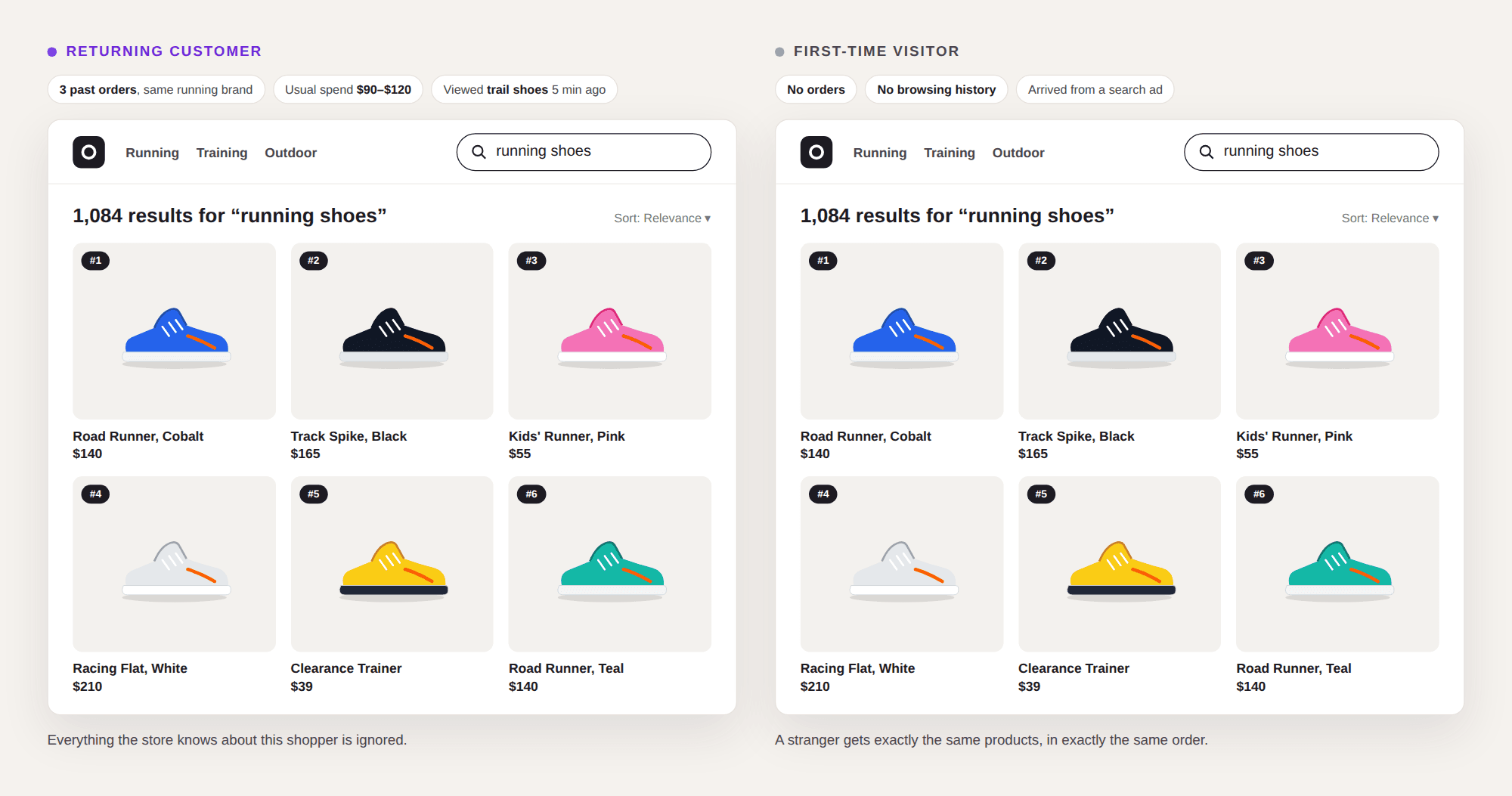
WHY THE SHOPPER LEFT: They had to do the work the site search should have done. Filter by size, brand, scroll past styles they'd never wear. Every extra step is a chance to give up. The query was the same. The shoppers weren't. Search only ever saw the query.
5. Search Only Gets Smarter When Someone Has Time to Fix It.
Every gap in traditional search becomes a ticket. A missing synonym, a common misspelling, a trend that took off on social media last week, a seasonal query, a campaign that needs its own landing page. Someone on the merchandising team has to spot it in a report, write the rule, test it and move on. Then the catalog grows by a few thousand SKUs and half the rules need revisiting. The site search is also only as good as the product data underneath it. If a supplier feed has no "material" or "occasion" field, searches like "linen shirt" or "party dress" can't work, however clever the matching.
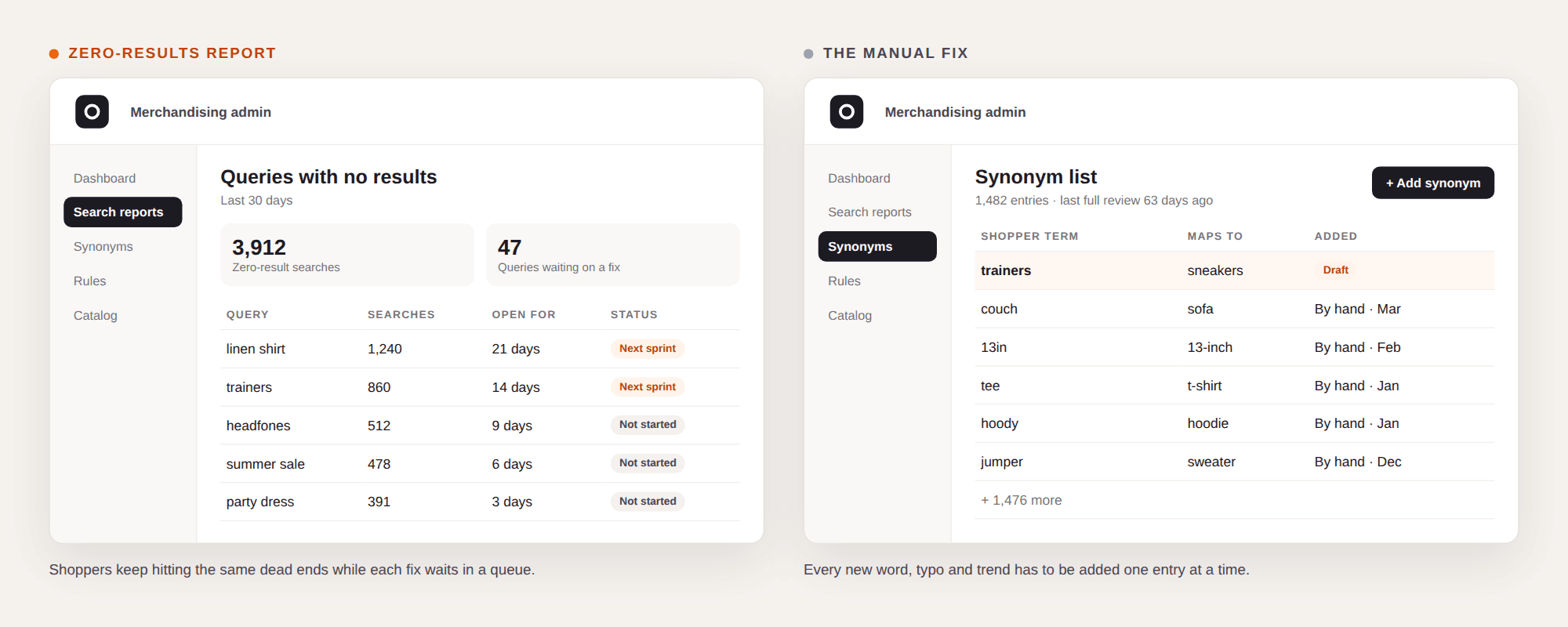
WHY THE SHOPPER LEFT: They arrived today, and the fix for their query is scheduled for the next sprint. Manual upkeep keeps search permanently a step behind. The backlog grows fastest in peak season, exactly when traffic is highest and teams have the least time. Traditional search learns from rules people write, not from the shoppers using it.
The Shopper Already Told You What They Wanted
These five moments share one root: search that reads the words in a query and ignores the shopper behind them. It misses intent, turns in-stock products into dead ends, rejects ordinary vocabulary, shows every visitor the same page and waits for a person to fix it. None of them shows up as an outage on a dashboard, which is exactly why they last. Each one is a shopper who arrived ready to buy, typed what they wanted, and left.
Each of these gaps has a specific fix, and that is where this series goes next.
Frequently Asked Questions
Traditional site search, often called keyword search, matches the words a shopper types against product titles, descriptions and tags. It returns products that share those words, without understanding what the shopper means or who they are.
Ecommerce site search powered by keyword search matches only keywords. It cannot read intent, synonyms, misspellings, long-tail queries or context.
Most shoppers take the first results page as the answer. When search returns nothing or the wrong products, they assume the store doesn't sell the item and go elsewhere.
Queries that describe a need rather than a product name. Keyword search fails at understanding intent, synonyms, regional terms and suggests incorrect products confidently.
It doesn't learn from shopper behavior. Every synonym, spelling variant, seasonal query and ranking rule has to be added by hand, and results depend on clean, structured product data that most catalogs lack.
More blogs for you to read


